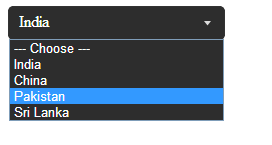
We have found a simple and decent way to achieve stylish select dropdown using CSS. It works across all browsers, simple to implement and moreover stylish.
1. Create a normal select dropdown as follows:
<select id="ddlCountry">
   <option value=""> --- Choose ---</option>
   <option value="India">India</option>
   <option value="China">China</option>
   <option value="Pakistan">Pakistan</option>
   <option value="Sri Lanka">Sri Lanka</option>
</select>
2. Now wrap the select with a div tag
<div class="ddlWrap">
   <select id="ddlCountry">
      <option value=""> --- Choose ---</option>
      <option value="India">India</option>
      <option value="China">China</option>
      <option value="Pakistan">Pakistan</option>
      <option value="Sri Lanka">Sri Lanka</option>
   </select>
</div>
3. Basically we are going to make the opacity 0 and add a background image for that
.ddlWrap select {
   opacity: 0;
   width: 215px;
   line-height: 1;
   border: 0;
   border-radius: 0;
   background: url("arrow_select.png") no-repeat 100% 0 #2D2D2D; //for IE
   -webkit-appearance: none; //for Google Chrome
   color: #fff;
   height: 32px;
}
.ddlWrap {
   width: 215px;
   overflow: hidden;
   background: url("arrow_select.png") no-repeat 100% 0 #2D2D2D;
   border: solid 1px #333333;
   border-radius: 5px;
   position: relative;
}
4. Now you will find a drop down with an arrow and no text to display, thats because the opacity is 0. Here we need to do a small tweak. We add addional span tag above the select and display the selected content.
<div class="ddlWrap">
   <span> --- Choose ---</span>
   <select id="ddlCountry">
      <option value=""> --- Choose ---</option>
      <option value="India">India</option>
      <option value="China">China</option>
      <option value="Pakistan">Pakistan</option>
      <option value="Sri Lanka">Sri Lanka</option>
   </select>
</div>
5. And update the style for span
.ddlWrap span {
   position: absolute;
   left: 10px;
   top: 5px;
}
6. Now with the help of jQuery we update the span with the selected dropdown text
$('select').click(function () {
   $(this).prev('span').text($(this).find('option:selected').text());
});
That’s it, we have done it. You can trigger a ready event and update the selected content, if you do not wish to hard code ‘— Choose —‘.
Click here to download the full source code.
Courtesy: Biswanath Dey (BD)